Access SSO Rajasthan Portal With SSO ID Login
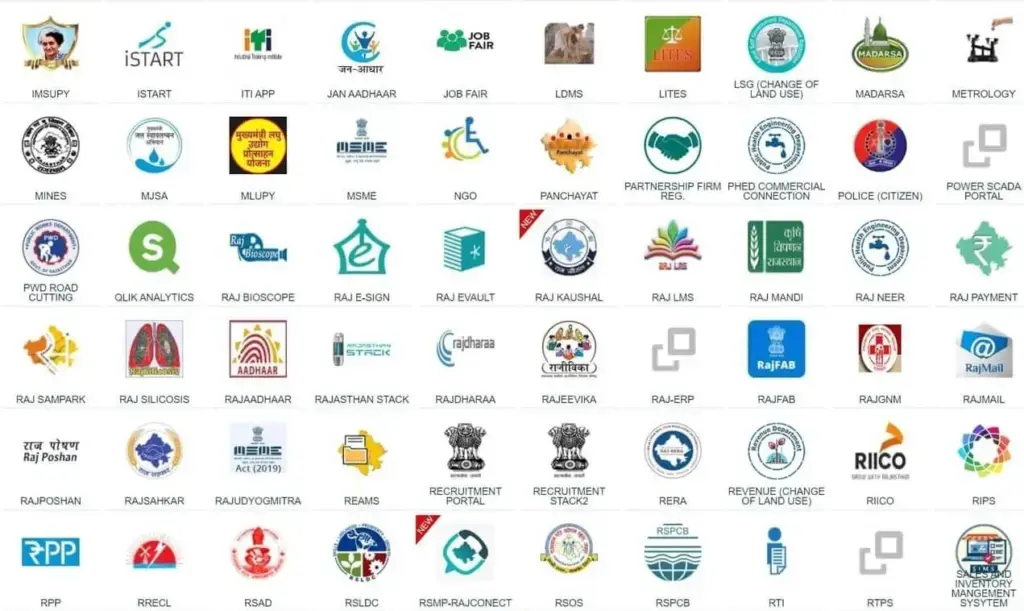
SSO ID Login Rajasthan Portal provides 100+ essential and most common services related to almost every department. So Register yourself now.
SSO ID Login Rajasthan Portal
An SSO ID Login (Single Sign-On) allows you to access services like paying bills, applying for jobs, filling forms, and checking different government schemes with a single password. Local public, government employees, students, and business owners can facilitate it.
Users can register and obtain their SSO ID by providing personal information (Name, Email ID, and Phone Number) on the official website portal. Save time and money, and enjoy hassle-free work by using an SSO ID.
What is SSO ID Login?
An SSO ID is a Government portal that eases access for citizens, business owners, and employees by providing access to 100+ services through a single digital portal and password. In Rajasthan, an SSO ID is necessary to apply for Rajasthan Government Jobs.
| Full Form of SSO | Single Sign-On |
| SSO Services | Recruitments Portal, Scholarships, GST portal, Arms license, Bhamashah card, Admit Card Download, e-Mitra Reports, e-Pass, (RSPCB), SSO Rajasthan ePass,(PHED), e-Devasthan, and many more. |
| SSO ID Login – Mobile App | SSO Raj- Single Sign On RGHS |
| SSO ID Help Desk | email Id: helpdesk@rajasthan.gov.in Contact Number – 0141-5123717, 0141-5153222 |
Who Launched the SSO ID Rajasthan?
In 2013, the Rajasthan State Electronics Development Corporation (RSDC) launched the SSO ID under the supervision of the Rajasthan Information Technology Department (RITD). This is designed to digitize services in one place with easy access, save time, and increase efficiency.
Main Objectives of the SSO Portal Rajasthan
The Government of Rajasthan introduces the SSO ID login to ease public access to different services with a single SSO ID and password. This reduces office traffic, saves time and money, and is easy to use. Some objectives of this Portal are:
- Unified Service Delivery: To provide a single platform for citizens, Business owners, and Government employees to approach more than 100 services with a single ID and password.
- Real-time Tracking: To get the latest update about their applications and other services requested by tracking them.
- Digitalization & Paperless work: To promote digital growth and hassle-free work.
- Transparency and Accountability: Reduces scams and corruption by allowing users to track their application status.
- 24/7 Accessibility: To ensure that all services are available 24/7 so users can connect whenever you want.
- Help For Students And Businesses: To allow students and business owners to easily access different platforms.
- All-Inclusive Governance: To connect with the public directly.
Benefits of SSO ID Rajasthan
SSO ID Rajasthan Portal plays an important role in providing services to both the public and the government. Here are some benefits:
SSO ID LOGIN For Citizens:
- The public in Rajasthan can access more than 100 services on a single platform using a single SSO ID and password.
- It provides the latest updates about different recruitments, government schemes, and many more.
- It promotes women’s empowerment by providing them with a digital identity to access different platforms, welfare schemes, and Employment Opportunities.
- It promotes transparency, and users can track the status of applications and other services requested.
- Registration and usage are completely free and simple for all citizens.
- It provides complete security, protects personal and financial information, and avoids scams by using secure authentication methods like OTP verification.
- It saves time, money, and reduces the need to visit offices physically for services.
- It provides help and support in case users face any difficulty through the helpline.
- Users can access government-based services, pay utility bills, fill out different forms, apply for jobs, and access different schemes online.
- Users can use it anywhere and anytime, as it works great on smartphones.
SSO ID LOGIN For Government:
- Reduces the need for different passwords to log in to different platforms.
- Provides easy and quick access to different platforms, official portals like IFMS, HRMS, and GPF from a single portal.
- Reduces the crowd in government offices and physical paperwork, which saves time, money, and makes work easy and simple.
- Promotes digital growth, efficient use of government resources, solidifies Rajasthan e-governance infrastructure, and better planning for Public services.
- Filters fake applications, centralizes user data, manages public records, and tracks service usage and application data effectively.
- Encourage transparency and accountability, which earns the public’s trust.
Services Available After SSO ID Login
An SSO ID is a way to access government services by using a single password. Once you are an SSO ID Holder, you can enjoy more than 100 services. Some of these departments and services are:
Citizen Services
After getting the SSO ID Login, users can access essential documents and certificates, Financial and utility bills, banking and tax information, employment and educational opportunities, land records, licenses, health schemes, etc. by using just one password.
Educational Services
SSO ID Login provides assistance to students and relevant authorities in managing their lifelong educational records, filling forms, applying for jobs, checking performances, scholarships, and competitive Exam information, Recruitment, certification, and curriculum guide, etc.
Business & Industry Services
With the help of SSO ID Login, entrepreneurs and industrial owners can access Business registration and identity, a single-window clearance system, Taxation and legal compliance, Tenders and Procurement, financial incentives and utilities, etc.
Agricultural Services
Raj Kisan Sathi Portal is used by farmers, agri-businesses, and animal breeders. This portal allows access to Subsidies and financial assistance, horticultural and input services, Marketing and mandi services, Animal welfare and compensation, and Insurance.
Health And Welfare Services
Healthcare for government employees, Social security pensions, family welfare, public healthcare schemes, and women and child development are accessible after an SSO ID login.
Transport & Vehicle Services
Services like Driver and Personal License, Business & Commercial, Public Transport and RSRTC, and Vehicle Registration & Tax Services can be accessed by citizens after SSO ID Login.
Tax & Revenue Services
After logging in with your SSO ID, the Commercial Tax Department and Revenue Department offer Commercial Tax & GST services, Revenue & Financial Management, and verification & compliance.
Labour & Employment Services
After logging in via SSO ID Login, users can access a variety of portals for Labour and Employment services such as Labor Department Services and Employment Department Services.
Legal & Police Services
With an SSO ID, you can get online FIR copies and track status, apply for character certificates and verifications, access ON-Call Lawyer services, and all other legal stuff.
Public Grievance & Information
Public grievances and information in Rajasthan is the core platform for submitting complaints, tracking complaint status and providing an opportunity to make a direct connection with the Government.
Government Employee Services
An SSO ID (linked via SIPF ID) holder, a government employee can manage records, finances, and administrative tasks. An employee can access RPSC services, personal, financial and welfare Services, administrative and HR services, salary and pension management, and Recruitment & career Progression.
Social Justice & Women Services
After SSO ID Login, users can access different services (Scholarships, Pensions, Hostel Admission, Palanhar Scheme, Women empowerment, Marriage assistance, and Digital Certificates, etc.) managed by the Department of Social Justice Empowerment (SJE) and the Department of Women and Child Development (WCD).
Land & Property Services
The Revenue Department and the Registration & Stamps Department provide different services, such as Apna Khata (E-dharti), DLC Rates, Urban land services, Building Plan Approval, Revenue court Management (RJ-RCMS), Digitally signed documents, property Registration, E-Panjiyan and land Conversion (90-A), after SSO ID Login.
Urban Development & Housing
With an SSO ID, citizens can approach the Urban Development and Housing (UDH) Department, Local Self Government (LSG) Department, development authorities (DAs), Urban Improvement Trusts (UITs), and affordable‑housing schemes across Rajasthan for planning and development, Registration, allotment and many more services.
Utility Services
Rajasthan SSO ID lets users access government-related utility services, such as electricity and water bills, tax payments, and mobile/landline bill payments, digitally with a single login. By clicking the “Utility” tab, users can make easy payments.
Other Services By SSO ID Login Rajasthan Portal
Eligibility For Creating an SSO ID
Eligibility for creating a Rajasthan SSO ID requires the following conditions:
The official portal allows registration with minimal requirements, such as a valid ID. The entire process is free and can be completed online.
Documents For SSO Login Registration
For security purposes, the SSO ID Login portal requires verified documents during registration.
| User Type | Key Documents |
|---|---|
| Citizens | Jan Aadhaar, Bhamashah Rojgar Srijan Yojana, Google/Facebook, Aadhaar |
| Businesses | BRN (Udyog/Business Registration Number) |
| Employees | SIPF number |
The official portal allows registration with minimal requirements, such as a valid ID. The entire process is free and can be completed online.
SSO ID Registration Process
The registration process is very simple and easy, and it is completed online. Here is a step-by-step process:
Step 1: Search and Open the official Rajasthan SSO portal.
Step 2: To create an account, click on the “Register” or “New User” option shown on the screen.
Step 3: After clicking Register, choose your required type: “Citizen”, “Government”, or “Udyog”.
Step 4: Fill in your required personal information, such as Name, Mobile Number, Email Address, and Aadhaar number, SIFP, Google account, etc.
Step 5: An OPT is sent to your mobile number. Use this OPT for verification.
Step 6: Choose a strong, secure password to protect your ID.
Step 7: Before clicking the “Register” button below, agree to the terms and conditions.
Step 8: After registering, you can update your profile.
Step 9: Now link your Jan Aadhaar, Bhamashah, or PAN card, if required for service.
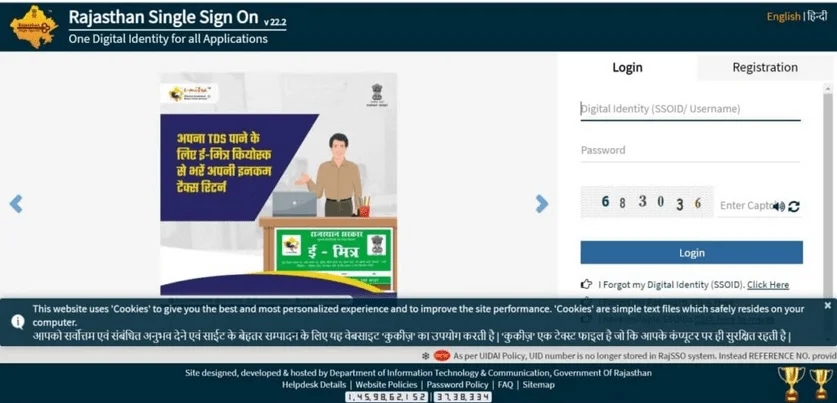
How to Log in for the SSO ID Portal
Users can log in to their SSO ID by following the process:
- Visit the official website of the Rajasthan SSO ID Portal.
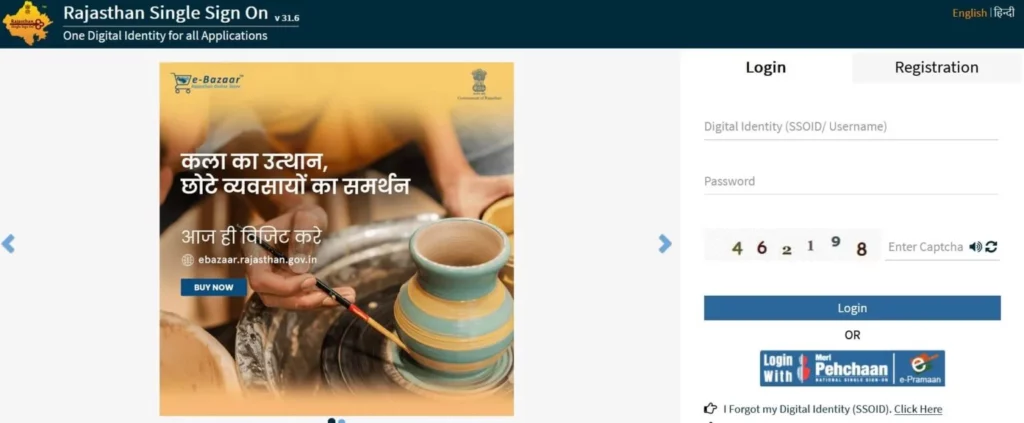
- Click the login section, then enter your SSO ID and password.
- In case users forget their password, they can click on the ”Forgotten Password” button and reset their password.
- For security purposes, enter the captcha code.
- Now click on the “Login” button.
After logging in, users can enjoy easy access to more than 100 government services online.
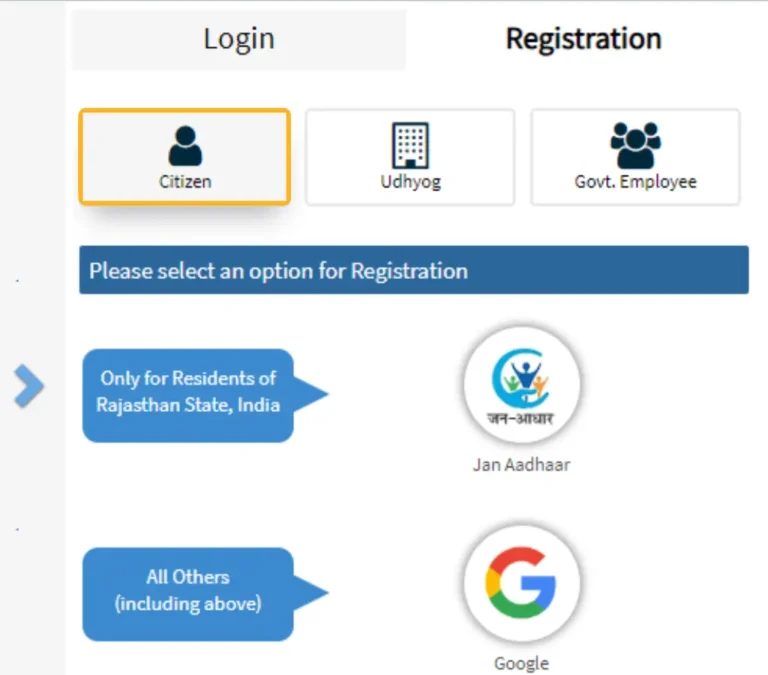
SSO ID Registration for Citizens:
Citizens can register themselves by following steps:
- Open the official website of SSO ID Rajasthan.
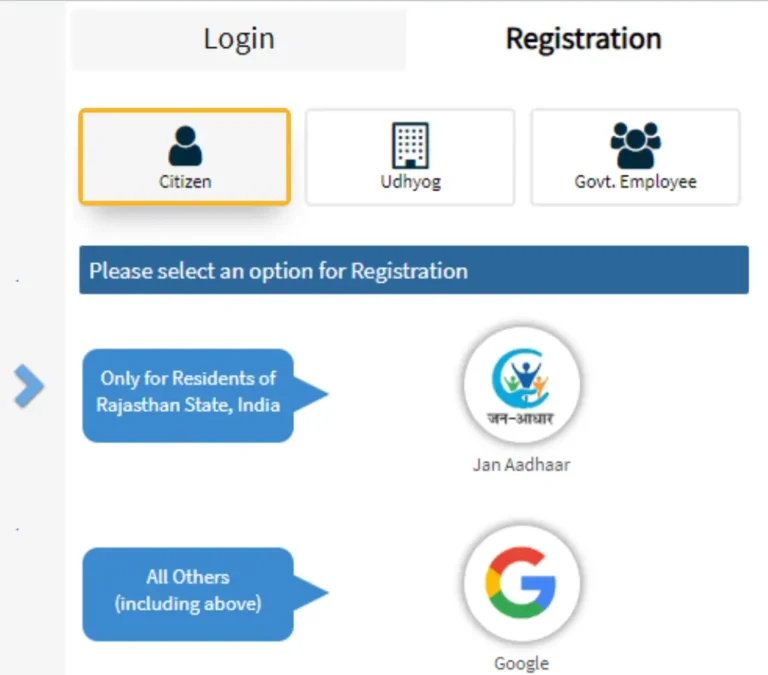
- Click the “Registration“ button and choose the “Citizen” tab .
- Use your Jan Aadhaar Card, Aadhaar, Google, Facebook, or Twitter.
- Enter the requested details, create a password, and submit .
After completing all the processes, you will receive your SSO ID and password.
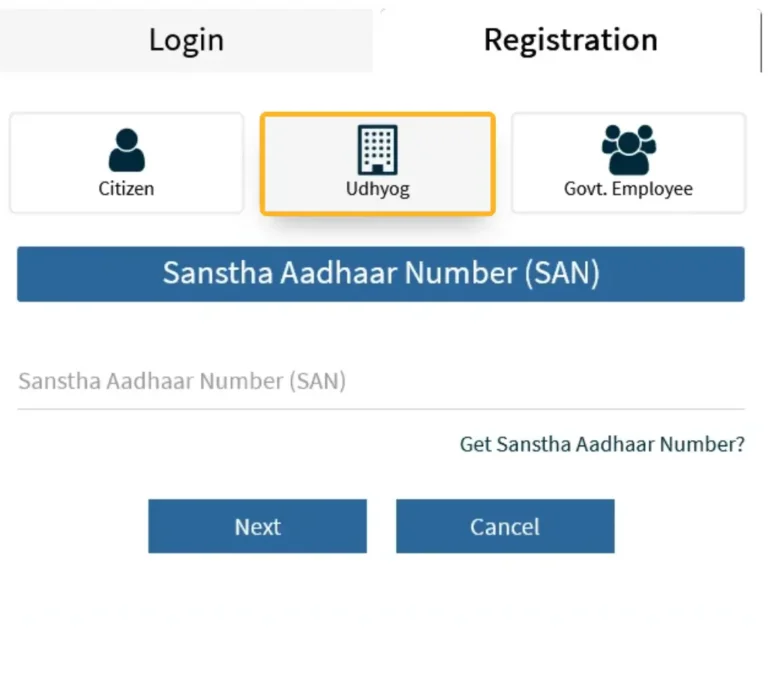
SSO ID Registration for Udyog/ Businesses:
Business owners can register themselves by using their business details.
- Open the official websites, click the “Registration” button, and choose the “Udyog” tab.
- Enter your BRN/ UAN and click Next.
- Fill in the form (Name, Mobile, E-mail) and register yourself.
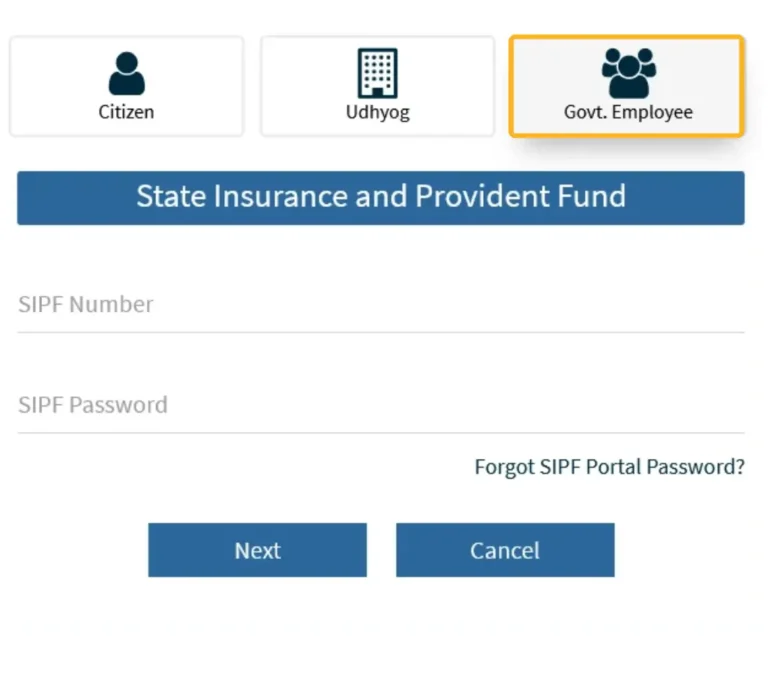
SSO ID Registration For Government Employees:
- Click the “Registration” button.
- Enter SIPF number and password.
- Complete profile and verify.
Registration Via Adhaar/ Bhamashah /Google
While creating an SSO ID, Aadhaar/ Bhamashah/ Google appears on the Rajasthan SSO portal for citizens to access government services.
Using Adhaar:
- Go to the official Rajasthan SSO portal and click the “Registration” button.
- Select Citizen as the user type.
- Choose Jan Aadhaar as your registration method.
- Enter the respective ID or sign in with Aadhaar, verify through OTP, then set up your SSO ID and password.
Using Bhamashah:
This is an old family ID scheme. Some portals still show the “Register via Bhamashah ID” option. In that case:
Select Bhamashah, enter your Bhamashah card number, verify with OTP, and then set up your SSO profile.
Using Google:
If you are not a Rajasthan resident or do not want to use Jan Adhaar/ Bhamashah, you can register yourself by using Google.
Choose the “Google” option, sign in with your Google account, and that email becomes your SSO username; then provide a mobile number and other basic details to finish registration.
SSO ID For Private Users Vs Government Employees
For Rajasthan SSO, “Private Users” are basically Citizens and Udyog, while government staff use a separate Government Employee category.
For Private User:
- Citizens use their SSO ID to access public services such as e‑Mitra, bills, admissions, job forms etc.
- Rajasthan residents and registered businesses in Rajasthan are Eligible.
- Citizens/Udyog can register themselves by choosing an identity such as Jan Aadhaar, Bhamashah, Google, mobile number, or BRN, and verify it with an OTP to create an SSO ID.
For Government Employees:
- Government Employee SSO primarily supports internal services such as salary slips, HRMS, department portals, and employee‑only apps.
- Only state government servants with a valid SIPF account are eligible.
- Government employees can register themselves by selecting the “Government Employee” button and can log in using their SIPF username and password.
| SSO User Type | Who it is For | How they Register |
|---|---|---|
| Citizen (private user) | Normal residents using govt services, students, job seekers | Jan Aadhaar, Aadhaar, Bhamashah, Google, mobile, etc. |
| Udyog (business) | Industry owners, firms with BRN/Udyog Aadhaar | Using Business Registration Number (BRN). |
| Government Employee | Rajasthan state govt staff (SIPF users) | Using SIPF number / SIPF username and password. |
Common Problems and Troubleshooting
The following problems and their solutions are faced by users during the SSO ID Rajasthan Login.
SSO Raj_Mobile App
The Rajasthani Government introduces the Mobile app called “Raj SSO” to make things simpler and easier for citizens, business owners, and Government employees. This app is available on the Play Store, and you can start this app by the following process:
Rajasthan SSO Help Desk
The official Rajasthan portal offers help desks that provide assistance to citizens while using SSO ID Rajasthan. Most issues faced by citizens are related to SSO ID registration or login issues. If you are experiencing any difficulties with the SSO ID Rajasthan login, contact the helpdesk for assistance.
Help Desk Contact Number:
If users face any difficulty during the SSO ID login process, you can contact the following help desks:
- Helpline Number (SSO ID/ Login issues): 0141-5123717, 0141-5153222 (Working Days, around 10 AM to 7 PM)
- Additional SSO Helpdesk Numbers (for multiple portals): 0141-2925554, 2925555, 2925561, 2925562
- Email ID (General SSO Support): helpdesk@rajasthan.gov.in
- Email ID (SSO login/ID specific): helpdesk.sso@rajasthan.gov.in
- Official Portal: https://sso.rajasthan.gov.in/
Conclusion
The SSO ID Rajasthan is a key to approach more than 100 government services such as filling forms, paying bills, and many other essential services online with a single password. The purpose is to focus on Digital Rajasthan growth, increase efficiency, save time, avoid hassle and make things easier for citizens, business owners, and government employees. The official portal includes help desks that assist users with any issues encountered during SSO ID Login.